
NormH.264 — we tell you whether it works on your footage, before you encode
NormMAP commutator-norm driven H.264 encoder. The gain is there on some material and not on other material. So this product decides before encoding whether your footage is a fit, and where it is not, it passes the material through unchanged — a hit cuts your bill, a miss leaves it where it was. Drop-in replacement for existing H.264 transcode pipelines, 100% playback compatibility (every H.264 player / hardware decoder / NLE plays it as-is). Trial version: 90 days + SLIMECODEC TRIAL logo overlay. SlimeCodec Convert v0.5.0-trial.
| Confirmed | −4–5% against x264 at equal quality (iso-VMAF BD-rate). All 5 materials win in the VOD shipping band (VMAF 93–96), spread −2.6 to −6.6%, median −4–5% — and a low-bitrate run with every condition swapped lands in the same place. A defensible lower bound |
| Expected | We expect −20–25% when quality is judged by eye — but this is an untested hypothesis with no measurement behind the number. VMAF evaluates luma only by construction, so differences in the chroma domain cannot register in the score at all. Our reading is that the confirmed figure is therefore a floor — but we do not yet have a ledger that answers "by how much". The measurement conditions, and exactly what we have not yet measured → |
| Guaranteed | A miss does not cost you. On material that does not suit it, the gate drops and the footage passes through (measured: material that grew by about +4% with the gate off lands at +0.1% with it on) |
Note that a headline like "a bloated master cut to 1/4" is a reduction against the source, and it moves with the input bitrate (see the table below). Judge the codec on the equal-quality figures above.
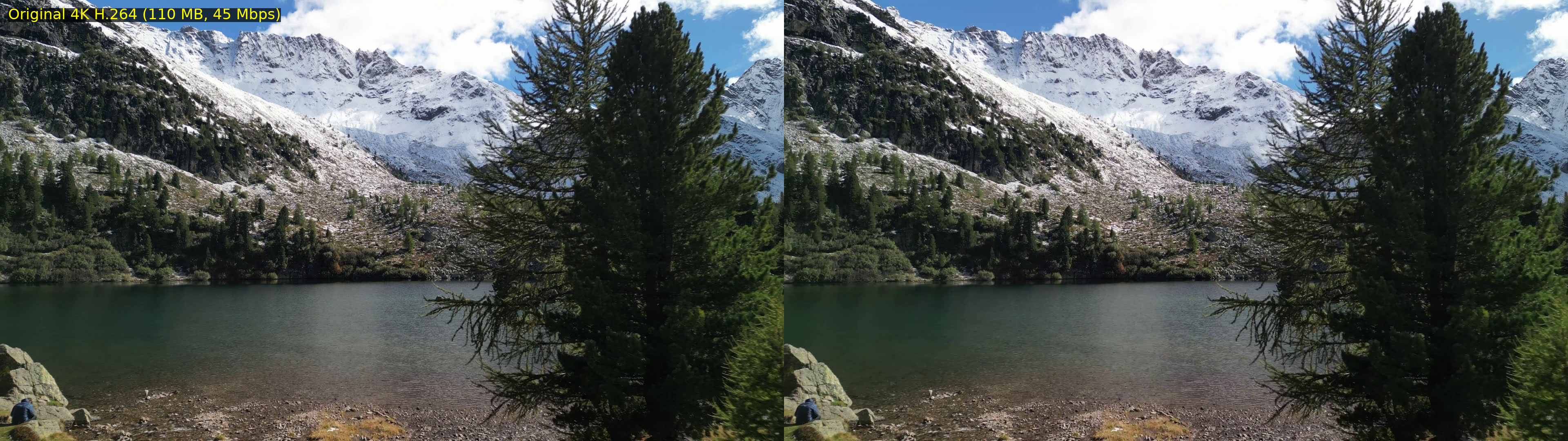
Visual confirmation — 4K side-by-side
Same 4K nature frame, original vs NormH.264 slime-1 (1/4 size). Click images to view full resolution:
Center crop zoom (detail comparison):
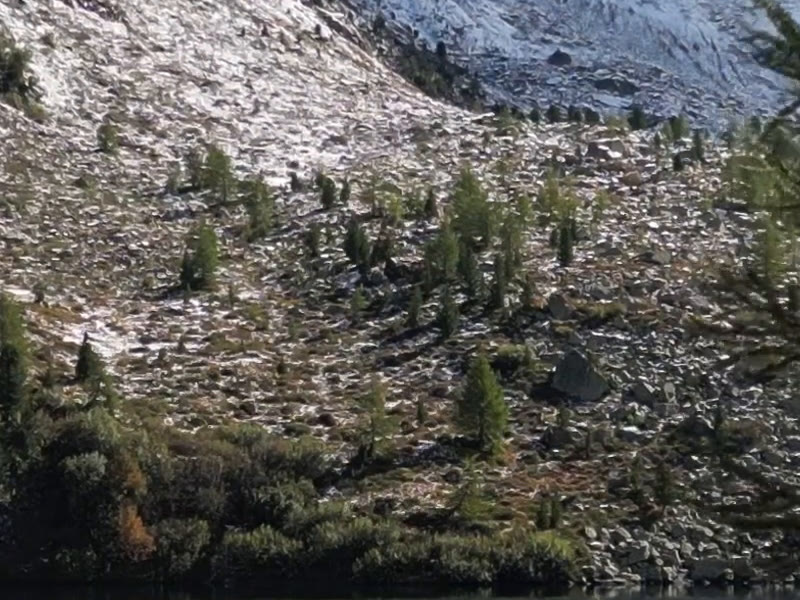
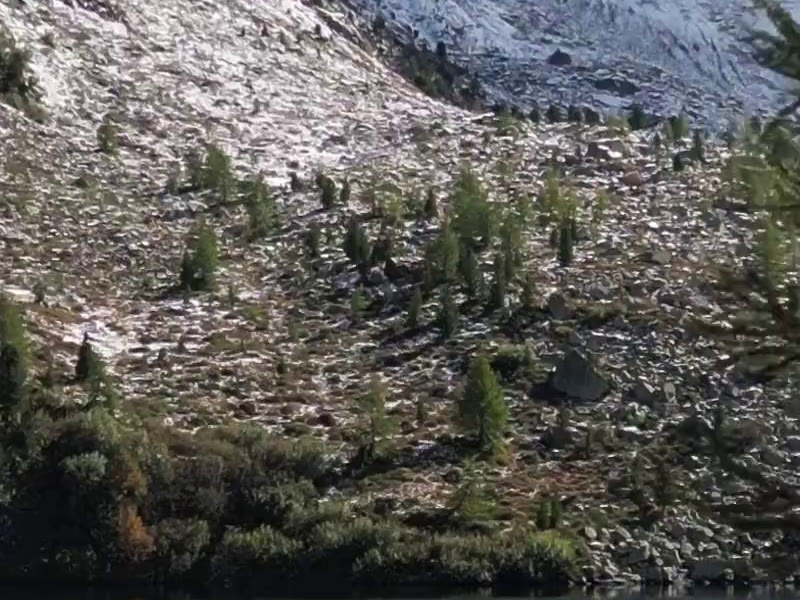
Left: original 110 MB · Right: NormH.264 28 MB (vs 45 Mbps master, VMAF 83.25)
Download (v0.5.0-trial)
4K empirical (measured on real source)
Measured on a 4K nature clip (3840×2160 30 fps, 20.4 s, H.264 AVC). These figures say how much smaller the output is than this input file — they are not a measure of codec efficiency (the more bloated the input, the larger they get):
| Output | Size | Reduction | VMAF mean | VMAF min | Visual |
|---|---|---|---|---|---|
| Source (45 Mbps) | 110 MB | — | (baseline) | — | — |
| NormH.264 slime-1 (recommended) | 28 MB | -74.3% | 83.25 | 72.31 | Hard to spot |
| NormH.264 slime-2 (aggressive) | 25 MB | -77.2% | 80.47 | 68.90 | Mild loss |
VMAF mean 83.25 (min 72.31). This is not lossless (there is a measurable PSNR difference), but at a normal viewing distance on typical content the loss is hard to notice. Perceived quality depends on the material and viewing conditions, so always verify with your own footage (free trial).
The material where we do win at equal quality is what the g2 check flags as a fit, and that measurement is the −4–5% above. The full ledger, wins and losses →
Where it fits / where it doesn't:
Fits: fixed-camera, high-quality sources for long-term archival (high-end / 4K surveillance, broadcast & production masters, medical & scientific imaging). Strongest at high quality.
Not for: (1) already low-quality / blocky footage (compression artifacts can be mistaken for detail and emphasized), (2) face- or gaze-centric intimate static scenes (the most-scrutinized detail can be dropped), (3) low-bitrate delivery (the gain fades or reverses in that range).
v0.5.0 trial highlights
--overlay-protect: masks watermark / overlay regions out of the commutator-norm computation. The SLIMECODEC TRIAL logo no longer disturbs bit allocation around it; no surrounding-pixel degradation.- AVX2 + FMA SIMD path, 12-thread parallelization, frame pipelining (decoder ↔ compute overlap)
- Content-aware auto-tune (surveillance / shake / sport / nature / generic auto-classification)
Quick start (Windows GUI, recommended)
- Download the GUI + CLI zip, extract to any folder
- Double-click
slimecodec-gui.exe - Click “Browse...” to select a video, then “Convert”
- Output is written to the same folder as
*_slime.mp4
Quick start (Windows CLI)
- Extract the zip to any folder
- From cmd / PowerShell:
slimecodec-convert.exe my_video.mp4 -o output.mp4 --auto-tune --keyint 2
Quick start (Linux)
tar -xzf slimecodec-convert-linux-x64-v0.5.0-trial.tar.gz
cd slimecodec-convert-linux-x64-v0.5.0-trial
./slimecodec-convert input.mp4 -o output.mp4 --auto-tune --keyint 2
Quality bias dial
Fine-tune the auto-tune decision on a single size⇔quality dial.
GUI exposes a slider; CLI uses the --quality-bias flag:
| Setting | Effect | When to use |
|---|---|---|
--quality-bias -0.02 | Stronger compression, smaller files | Compression-priority, accept mild loss |
--quality-bias 0.0 (default) | Balanced | Most cases |
--quality-bias +0.02 | Weaker compression, larger files, higher VMAF floor | Quality-priority, broadcast use |
Range -0.10 to +0.10, step 0.01 recommended. Only effective with
--auto-tune.
- No user registration required — use it immediately after download (we send no emails, no DMs, ever)
- Video output is stamped with the SLIMECODEC TRIAL logo overlay (burned into the Y plane; not for commercial use)
- Stops working at the earlier of 90 days from first launch or 1000 launches
- Hardware fingerprint locked (tied to a single machine); PC date rollback is detected and rejected
- Encrypted license file:
~/.slimecodec/license_v2.dat(32-byte XOR + integrity tag)
--overlay-protect, no
visible degradation occurs around the TRIAL logo.
(Custom-logo substitution is planned for the future commercial release.)
AV1 path
For AV1-only delivery scenarios (new GPUs / iOS 17+ / AV1 decode capable browsers), see NormAV1 — research preview. AV1 hardware playback reach is around 50% of the market; for general use, NormH.264 is recommended.
Commercial release
The paid / commercial release is currently under consideration and not public. Terms and conditions are handled on an inquiry basis: sasaki@javatel.co.jp
SlimeCodec is proprietary software. Patents pending: JP 2026-046898 / 2026-046609 / 2026-046625 (PCT migration planned).